I still remember the day my desk finally betrayed me. Three laptops, two external drives, a 4K monitor, a webcam, a podcast mic, and a tangle of cables that looked like a raccoon had been wrestling a bowl of spaghetti. Every time I switched between my work machine and my personal rig, I had to unplug and replug a dozen connectors. It was a ritual, and not a pleasant one. So when I got my hands on the IVANKY 26-in-1 FusionDock Ultra, I honestly didn’t expect it to change how I work. I just hoped it would clean up the mess. It did far more than that.

One Dock, Twenty-Six Reasons to Ditch the Dongle Life
Let’s be honest: most docks promise “everything you need” and then deliver three USB-A ports and a prayer. The FusionDock Ultra is not that dock. It’s built around Thunderbolt 5, which means it isn’t just keeping up with modern laptops — it’s future-proofing your entire setup. Whether you’re on a Thunderbolt 5 machine or still rocking Thunderbolt 4 or USB4, this thing plays nice. That kind of backward compatibility matters when you’re spending real money on quality gear.
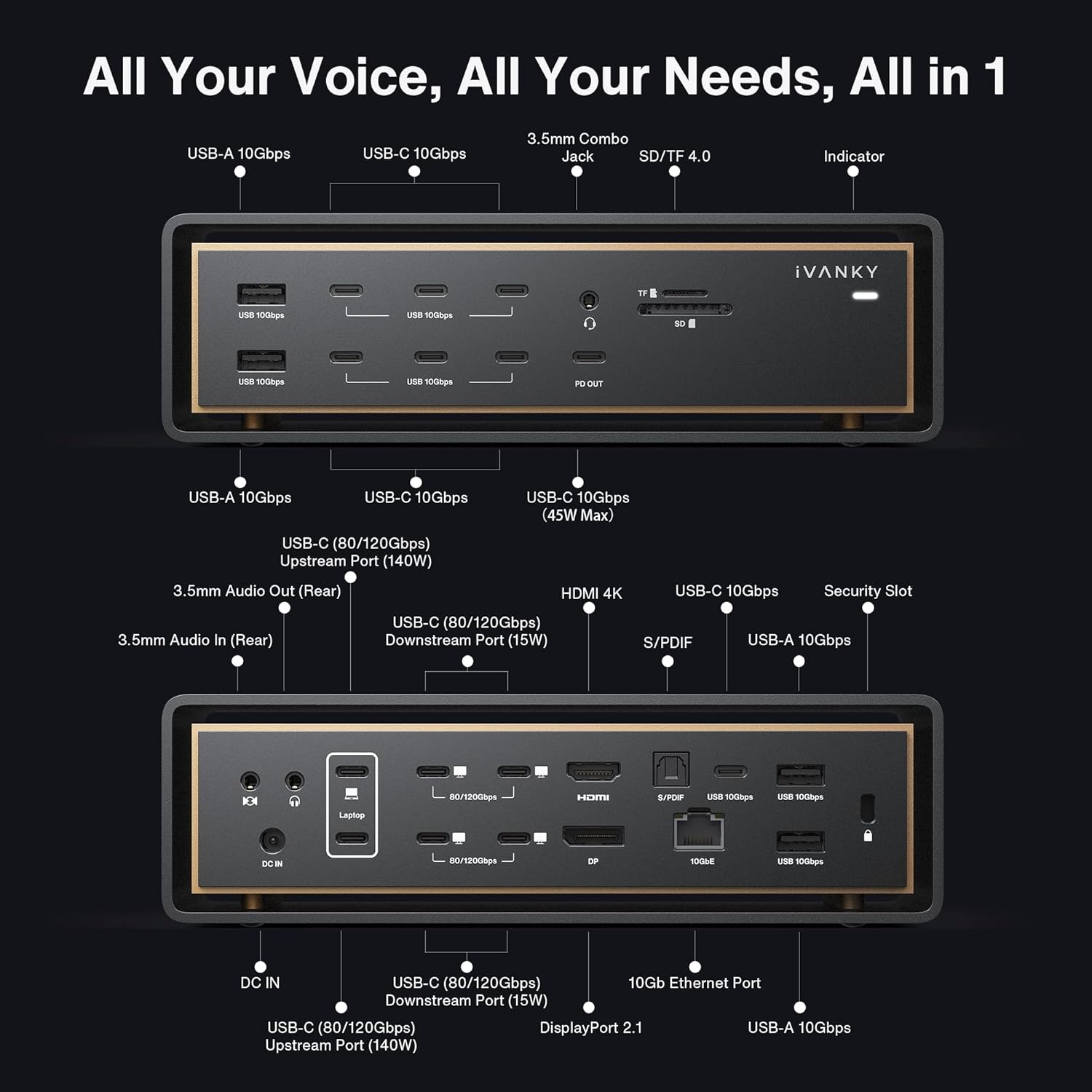
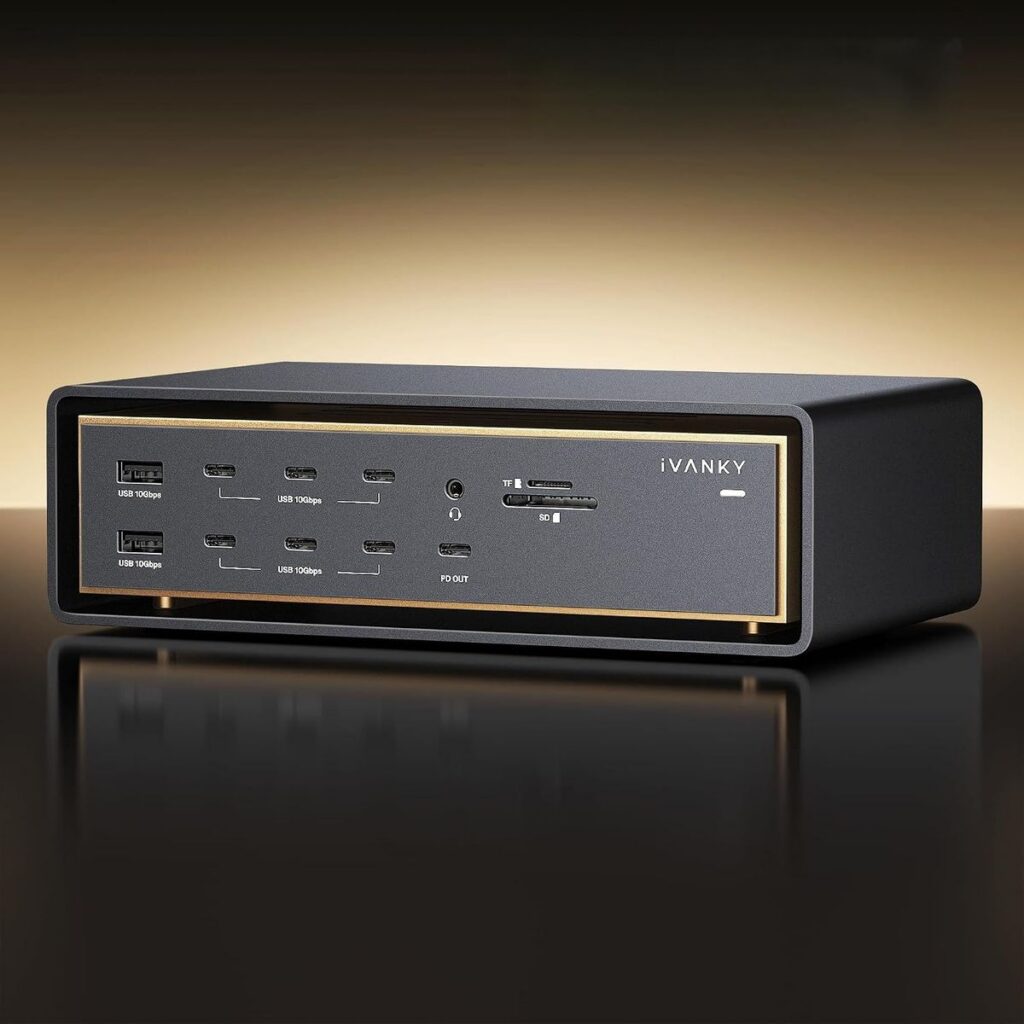
The “26-in-1” label isn’t marketing fluff either. I counted. There’s a staggering array of ports here: multiple USB-C and USB-A connections, HDMI and DisplayPort outputs, an SD card reader, a microSD slot, audio jacks, and — the headline feature for anyone who works with serious data — a 10GbE Ethernet port. That last one is the kind of spec you usually only see on enterprise-grade equipment. Having it on a desktop dock is genuinely exciting if you move large files, run a home server, or just refuse to wait on a 1GbE connection ever again.
Why Thunderbolt 5 Changes Everything
Thunderbolt 5 is the new standard, and it’s a beast. We’re talking bandwidth that makes older connections feel like dial-up in comparison. For the FusionDock Ultra, that translates to smoother 8K display support, faster data transfers, and the ability to daisy-chain without choking your workflow. If you edit video, work with 3D assets, or juggle virtual machines, you feel that headroom immediately. Even if you’re “just” a power user with fifty browser tabs and a spreadsheet the size of a phone book, the responsiveness is noticeable.
What I appreciate most is that IVANKY didn’t cut corners on thermal design. Docks that push this much power tend to run hot. The FusionDock Ultra stays cool under load, which means it won’t throttle your transfer speeds halfway through a critical backup. That’s the kind of detail that separates a product built for real work from one built for a spec sheet.

The 10GbE Port: The Feature You Didn’t Know You Needed
Let’s talk about that 10GbE Ethernet port for a second, because it deserves its own moment. Most people think their internet is fast enough. Then they try to transfer a 50GB project file over a network and watch the progress bar crawl. With 10GbE, that same transfer finishes in a fraction of the time. If you run a NAS, work in a studio, or collaborate with a team over a local network, this single port can save you hours every week. It’s the difference between “I’ll send it over” and “it’s already there.”
For online shoppers comparing docks, this is often the feature that tips the scale. Plenty of competitors offer Thunderbolt 5. Very few pair it with 10GbE at this price point. IVANKY clearly understands what professionals and serious enthusiasts actually need, and they’ve delivered it without forcing you to buy a separate network adapter.
Real-World Performance You Can Feel
I ran the FusionDock Ultra through my typical chaos: a 4K monitor at 144Hz, an external SSD for video editing, a wired keyboard and mouse, a USB microphone, and a webcam — all connected simultaneously. No lag. No dropped connections. No mysterious “device not recognized” pop-ups. I even plugged in a second laptop and switched between them without rebooting. It just worked.
That reliability is the unsung hero here. You don’t notice a great dock because it’s exciting. You notice it because it disappears into your workflow. The FusionDock Ultra does exactly that. It’s the quiet, dependable backbone of a setup that finally feels professional instead of patched together.

Who Is This Dock Actually For?
If you’re a casual user who checks email and watches YouTube, this might be more dock than you need — and that’s okay. But if you fall into any of these categories, the FusionDock Ultra is worth a serious look:
- Creative professionals who need fast storage access, multiple high-res displays, and reliable networking for client files.
- Remote workers and hybrid employees who want one cable to connect everything when they sit down at their desk.
- Gamers and streamers juggling capture cards, peripherals, and high-refresh monitors without compromise.
- Home lab enthusiasts running servers, NAS units, or virtual machines who need that 10GbE backbone.
- Anyone tired of dongles who wants a clean, permanent, high-quality solution instead of a drawer full of adapters.
The build quality matches the ambition. The aluminum chassis feels solid, the ports are snug without being stubborn, and the whole unit has a premium weight that tells you it’s not going to slide around your desk every time you plug something in. IVANKY has clearly invested in materials, not just marketing.
Setup, Compatibility, and Peace of Mind
Setup took me under two minutes. Plug in the power, connect the Thunderbolt cable to your laptop, and everything else is already waiting. No driver hunting, no cryptic software. It works with Windows and macOS, and it’s compatible across Thunderbolt 5, Thunderbolt 4, and USB4 systems, so you’re not locked into one ecosystem.
That cross-compatibility is a big deal for anyone who upgrades hardware regularly. You buy this dock once, and it stays relevant through your next laptop, and probably the one after that. In a world where tech ages fast, that’s real value.
Final Thoughts: A Dock That Earns Its Place
I’ve tested a lot of docks, and most of them are fine. The IVANKY 26-in-1 FusionDock Ultra is not fine — it’s genuinely excellent. It combines Thunderbolt 5 speed, a rare 10GbE port, and a generous 26-port layout into a package that feels built for people who take their setup seriously. If you’re shopping for a dock that will clean up your desk and future-proof your workflow, this is the one I’d tell a friend to buy. And that’s the highest compliment I can give.